

jmkim.over-blog.com/
15 Février 2021

Now launch the manycam client software and click the + button located in the middle of the manycam client screen Select IP CAMERAS ADD NEW. Select the ADD IP CAMERA option Type in a name for the camera and the cameras RTSP callout. RTSP URL: the live stream URL of your IP camera. Different types of cameras have different URL formats, so you will need to find the RTSP URL that is correct for your camera stream. The URL may have a username/password in it as well. Choose RTSP, enter the camera address and the RTSP streaming port. Select H264 as the image type. Apply the resolution of 704x480. Apply a frame rate of 15fps. Apply a compression of 30% compression.Note: The port in this example is 7210 because the IP has been resolved as a DNS name so that the camera could be accessed over.
Almost IP surveillance cameras support RTSP video stream, that means user can use media player to watch the live video from anywhere. RTSP is the abbreviation of real time streaming protocol, it's a network control protocol designed for use in entertainment and communications systems to control streaming media servers. The protocol is used for establishing and controlling media sessions between end points. This article describes how to play RTSP video stream of IP cameras on VLC player, QuickTime player, and a mobile phone with popular IP camera viewer App.
VLC player and QuickTime player are free media players that support cross-platforms (Windows OS, Mac OS), these two media players have capability to play most multimedia files and various streaming protocols.
Users can use VLC player and QuickTime player to watch live video/image, also view the information of codec detail for MJPEG/MPEG4/H.264 which supports RTSP protocol.
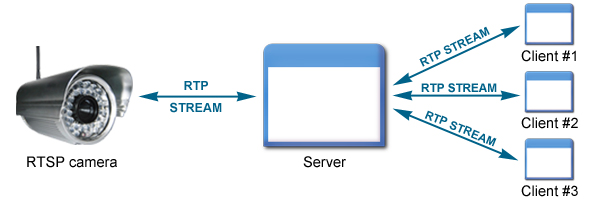
Additionally, user also can find smartphone App which supports RTSP protocol. Using the Smartphone App, user can watch live video streams easily through smartphone from anywhere, anytime.
Both media players are free to download, install and use. You can go to the media player official websites to download the latest version software, then install in your computer.
Before using the RTSP protocol, you need to know your IP camera's RTSP URL setting. The URL is an IP address with port and authorization information (user name + password). All available RTSP URL formats for IP cameras are listed in table below. Please select the suitable one according to model of camera under testing, with 'IP Camera address' being replaced by your dedicated IP address number. If you can't find port information, the default RTSP port number is 554.
| Camera Model | RTSP URL |
| NCR870/NDF820/NDF821/NDF831/NDR891/NDF8 20PRO/NDF821PRO/NDF831PRO/NDR891PRO/NC B855PRO/NCR875PRO/NCC800/NCB858/NCR878 | rtsp://IP Camera address:8557/h264 for Primary stream |
| NDR720/NCB750/NCR770/NDR721/NDR722/NCB 752/NCR772/NIC990/SPD970/PTZ900/NCB358/N CB355/NCR368/NCR365/NOD398/NOD395/NOD3 85/NID338/NID335/NID325/NID321/UFD305/UF D301 | rtsp://IP Camera address/stream1 for stream1 rtsp://IP Camera address/stream2 for stream2 rtsp://IP Camera address/stream3 for stream3 |
| NCC700/NDZ760 | rtsp://IP Camera address:554/h264/quad/media.amp rtsp://IP Camera address:554/mjpeg/quad/media.amp |
1. Check current stream and codec setting by IE browser
Setup > Image > Codec
Go to Codec page. Check codec setting on available streams.
2. Check RTSP port setting
Setup > Network > RTSP
Go to RTSP page. Check RTSP port numbers on camera for dedicated stream.
The Default RTSP port number of each camera model can be found in the User Manual.
3. Open Network Stream
Open VLC player and select 'Open Network Stream' from the Media menu.
4. Enter a network URL
Type the network URL in the dialog box below, and then click Play to play the video with RTSP stream. Refer to Sec. RTSP URL Setting above for URL setting format for Messoa IP cameras.
After click 'Play', you will see the RTSP live video stream on VLC player.
1. Check codec, stream & RTSP port numbers.
Follow steps 1 & 2 in section 'How to play RTSP stream with VLC Player' above to check the codec, stream and port numbers.
2. Open QuickTime Preferences
Edit→Preferences→QuickTime Preferences
Open QuickTime player and select 'QuickTime Preferences' from the Edit menu. Battle net luncher.
3. Set Safe Mode
Go to Advanced page. Click 'Safe Mode' and 'OK' for normal video display.
4. Open URL
File→Open URL
Select 'Open URL' from the File menu.
5. Enter URL
Type the network URL in the dialog box below, and then click OK to play the video with RTSP stream.
Refer to Sec. RTSP URL Setting above for URL setting format for IP cameras.
6. View Live Stream
You will see the RTSP live video stream on QuickTime player now.
1. Download and run app on your smart phone
2. Enter URL
Please refer to Sec. RTSP URL Setting above for URL setting format for Messao IP cameras.
3. Enter Messoa camera's account/password. The default is admin/1234 Fnaf last night.
4. After that, the app can get RTSP video stream from Messoa IP camera.
Get My Latest Posts
Subscribe to get the latest updates.
Your email address will never be shared with any 3rd party.


/image%2F6289966%2F20210221%2Fob_8b1e92_makerbot-bundle-beta.jpeg)
/image%2F6289966%2F20210221%2Fob_3fc2e5_alex-mace-linkedin.jpeg)
/image%2F6289966%2F20210221%2Fob_733d71_fortnite-apk-launcher.jpeg)
/image%2F6289966%2F20210221%2Fob_26e4d7_nintendo-customer-service-website.jpeg)